
Is Datagma safe on LinkedIn?
4K+
3.6.5
2025-06-25
Research professional contact details from LinkedIn profiles, including emails, direct dials, and social media profiles.
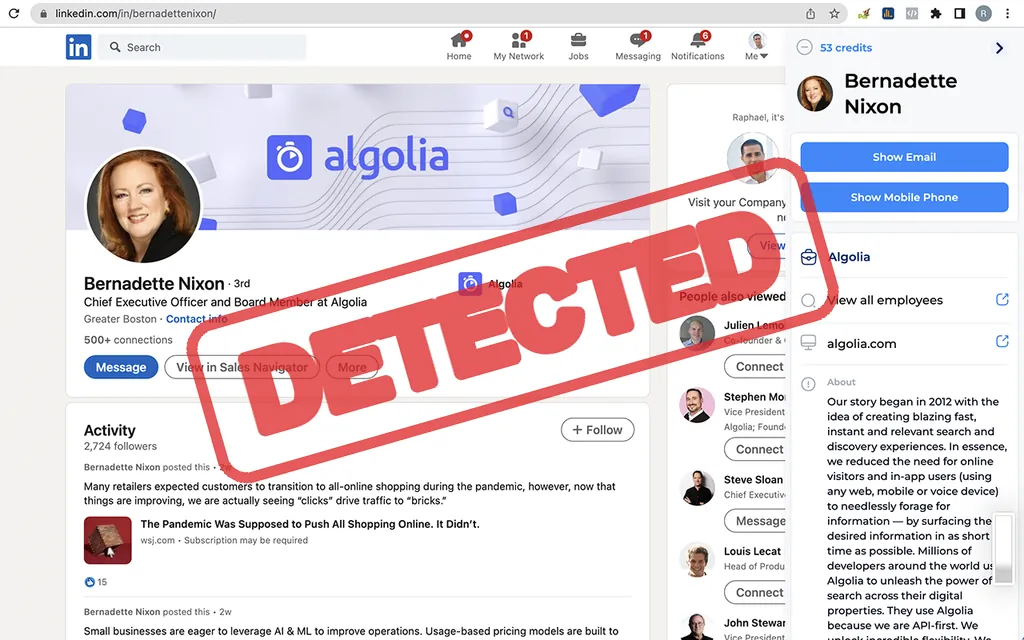
This browser extension is actively compiled into LinkedIn's frontend detection lists. LinkedIn's scripts can detect when this is active on your browser.
What this means: detection isn't an instant ban — it's one input to LinkedIn's risk score. But it's a standing signal: it stacks with your behavior (volume, programmatic clicks) and device fingerprint, and this is just the AED list — one of LinkedIn's three detection systems (see how it works).
There's no 'authorize with LinkedIn' step anywhere. Simplified from its manifest — here's what actually happens between install and your first page load.
Permissions granted on install:
5 permissions requested — no LinkedIn login involved
That verdict isn't a guess. This is what LinkedIn's own page code does on every visit — simplified from its production bundle, which the BrowserGate investigation reverse-engineered line by line:
// chrome-extension://jcpkgjfbhhglonendnnmicgicebbemjd/assets/images/share-icon.png
We downloaded Datagma's published Chrome Web Store package, de-minified it, and read it file by file — no live LinkedIn login. Two ways to see how:
Downloaded straight from the Chrome Web Store — the exact file your browser would install.
Where your session and data actually go, reconstructed from Datagma's code. Datagma reads your li_at cookie and uploads it — its cloud then acts as you, from its own IP.
red = your session/data leaving your machine · blue/green = stays local or only results leave · dashed = LinkedIn's own detection probes
LinkedIn doesn't need to know anything about proxies to catch this — it just needs one login cookie answering from two networks at the same time.
Datagma uploads your session cookie, so it can answer from its own network at the same time you're logged in from yours — one login, two places, at once.
We measured real exit-IP reputation for 7 vendor clouds in a dedicated study — Datagma's own infrastructure wasn't in that sample. The mechanism a session-upload creates is identical regardless: two networks, one cookie.
Does LinkedIn detect Datagma? What we found in its code
Everything we confirmed in Datagma's code, grouped by what it means for your account. Red = strongest detection / risk signals, amber = notable, grey = neutral or local-only.
Uploads your LinkedIn session to its cloud · not on the AED list (still detectable)
Signals LinkedIn's own page scripts can pick up directly on every visit — the extension probe (AED), code injected into the page (Spectroscopy), fake (isTrusted:false) clicks, blocked/missing telemetry, and cloud remote-control. Each adds points to its risk score.
How the tool touches your LinkedIn login. If it uploads your session cookie to the vendor's cloud, the vendor can act as you from another IP — LinkedIn's loudest parallel-access tell. Reading the cookie locally (csrf/Voyager) is far less risky.
Every outbound destination found in the code — your session / scraped data, plus analytics, CRM pushes and CAPTCHA-solving services. LinkedIn can't see these, but it's where your data actually ends up.
Chrome permissions the extension was granted on install. The highlighted ones are the powerful kind — cookies (read your session), webRequest/declarativeNetRequest (watch & rewrite traffic, incl. blocking LinkedIn's telemetry), scripting/tabs (inject into pages).
How many times each tell-tale pattern appears in the extension's code — the raw proof behind everything above (e.g. li_at = session-cookie reads, voyager/csrf = LinkedIn API calls, synthetic_event = fake clicks, recaptcha = challenge handling).
Even after a cookie is copied out, LinkedIn keeps one more receipt on every request that follows — a 48-point snapshot of the exact machine making it. Faking it convincingly means reproducing that machine's quirks, not just editing a string.
Press play to run the scan. These are illustrative values — this demo never reads your actual device.
Datagma — FAQ
Is Datagma safe to use on LinkedIn?
Our static code audit rates Datagma HIGH risk. Its extension reads your LinkedIn session cookie and sends it to gateway.datagma.net/api/ingress/v1/store_token, so your account can be operated from another IP — one of LinkedIn's strongest ban signals. No automation tool is ban-proof, and this one exposes a large detection surface.
Does LinkedIn detect Datagma?
Its ID isn't on LinkedIn's AED list in our latest snapshot, but that is not the same as "undetectable": it injects code into the LinkedIn page, which a second scanner (Spectroscopy) catches with no list at all, and LinkedIn's detection lists grow by roughly a dozen entries a day.
Can Datagma get my LinkedIn account banned or restricted?
Detection isn't an instant ban — LinkedIn scores accounts on many cumulative signals. But Datagma stacks code injected into the page, programmatic (isTrusted:false) clicks, your session running from a foreign IP, and independent reviews report restrictions and permanent bans for Chrome-extension automators. Safe daily limits reduce the behavioral risk but can't offset a detectable architecture.
Does Datagma have access to my LinkedIn account?
Yes. Its extension reads your li_at session cookie and sends it to gateway.datagma.net/api/ingress/v1/store_token, so the vendor can act as your LinkedIn account from their own servers — even with your browser closed.
How does Datagma work — is it a Chrome extension or a cloud tool?
Datagma is a extension (cloud-bridge / session-upload): the Chrome extension bridges your session to the vendor's cloud, which runs the automation server-side.
What is a safer alternative to Datagma?
A standalone desktop app such as Linked Helper removes the two extension-specific detection surfaces: there is no Chrome-Store ID for LinkedIn's AED scanner to probe and nothing injected into the page for its DOM scan, and your session never leaves your machine. No tool is unbannable, but the surface it exposes is far smaller.
This one's detectable. Switch to the desktop app — and get 20% off.
The one tool we tore down that isn't a browser extension at all — so it leaves LinkedIn the smallest surface to detect.